





 Home
Home- Data Integration
Data Integration

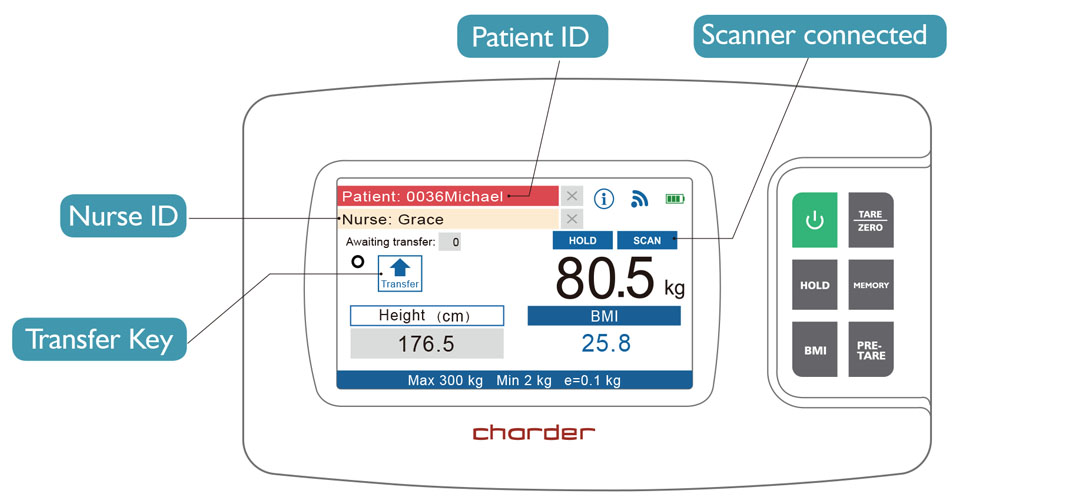
1 Establish Patient Data
Establish patient ID/identifier, so device can quickly scan and save results during measurement procedure.

2 Prepare for Measurement
Sterilize platform, and input pre-tare weight deduction if needed.

3 Input User ID and Patient ID
Scan user and patient ID (or input manually using touchscreen) to ensure correct person is measured.

4 Conduct Weight and/or Height Measurement
Press "HOLD" to confirm that results are to be saved and transferred after completion.
If digital stadiometer is attached to device, height measurement and BMI calculation will be completed automatically after patient steps onto platform.

5 Send Measurement Results to EMR System
Send results to EMR system with a single button press. If device isn't currently connected (ex: chair scale conducting measurement in patient's room), up to 100 results can be stored in device memory to be transferred when scale is returned to connectivity station.

6 View Results on System
Compare results with previous measurements to analyze trends.
Windows 7, 8, and 10 supported

Compatible Devices

Column Scales
- MS2580
- MS3980
- MS4980

Wheelchair Scale
- MS3880

Chair Scales
- MS5470
- MS5480
- MS5880

Infant Scale
- MS5980
- MS7900

Bed Scale
- MS6080
Contact us about integration to your EMR system!

If you see this icon next to a product, that means it is part of the DP48 integration series.